How to Register MSCOMCT2.OCX in Windows 7
I got following error while incorporating “Microsoft Windows Common Control-2 6.0(SP2) into my Visual Basic 6.0 application.
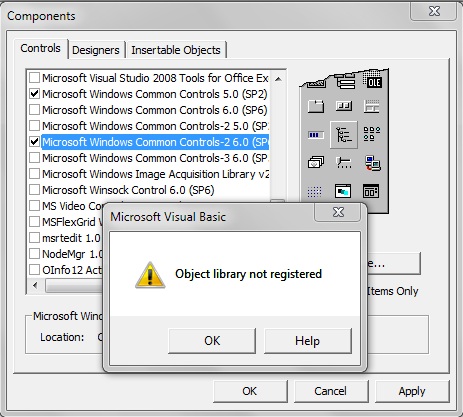
What is the reason of this error?
I Google a lot and find out many answers of this problem. Check out below steps to resolve this issue which helped me to get out of this problem.
Default locations of MSCOMCT2.OCX in your computer:
In case you are using a 32-bit version of Windows:
- C:\Windows\System (Windows 95/98/Me)
- C:\WINNT\System32 (Windows NT/2000)
- C:\Windows\System32 (Windows XP, Vista, 7)
In case you are using a 64-bit version of Windows, you should also place it in
- C:\Windows\SysWOW64\
First check MSCOMCT2.OCX file on the given location. If the file exists then try to register MSCOMCT2.OCX with following command.
- Open Start menu and select “Run”.
- Type CMD and press Enter (if you use Windows ME, type COMMAND).
- Change default directory to OCX directory using CD C:\WINDOWS\SYSTEM32
- Type regsvr32 MSCOMCT2.OCX and press Enter.
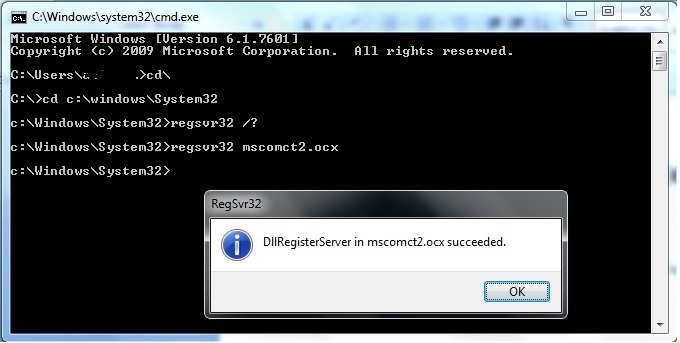
In case it doesn’t work, you will have to download new MSCOMCT2.OCX to your system directory.
- Make a backup copy of the original file.
- Overwrite existing file.
- Try to register again with above command.
Please comment below if you are still facing the same problem.
I use SEMRush for Keyword Research & Boost Organic Traffic. Do You?
Highly recommended SEM & SEO Tool for overview of Traffic, Keywords, Backlinks and more. You can search your competitors URL to analyze keywords & crush your competition.


Comments
Post a Comment